Groups (Disciplines)
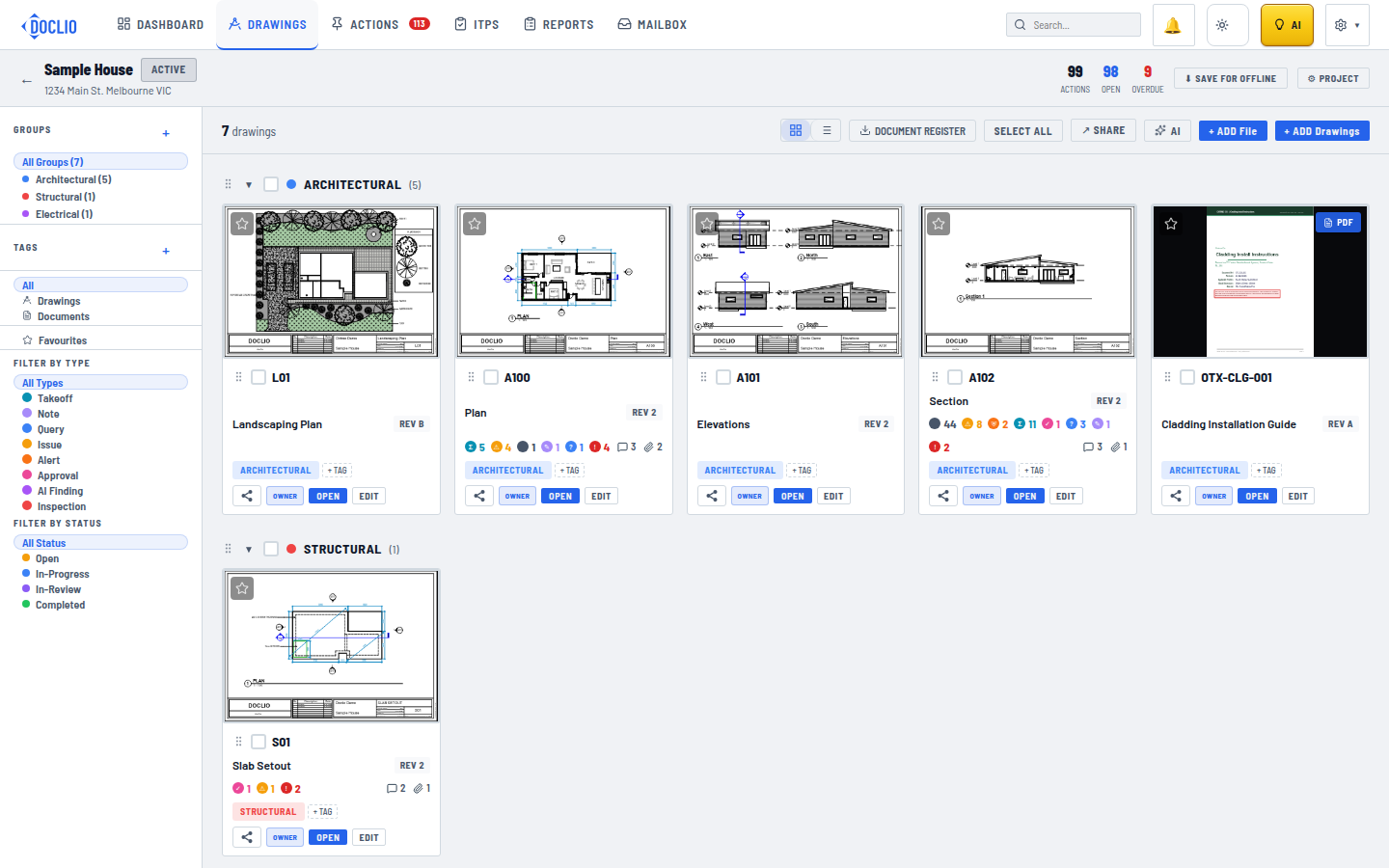
Drawings organised by groups (Architectural, Structural) in the sidebar
Groups help you organise drawings by discipline, trade, or category. They appear in the sidebar of the Drawings view and make it easy to filter and find drawings.
Default Groups
The New Project form offers eight standard groups: Architectural, Structural, Mechanical, Electrical, Plumbing, Civil, Landscape, and Fire. The first four are ticked by default — untick any you don't need, tick the others, or add your own custom groups before creating the project.
Creating a Group
- In the Drawings view, find the Groups section in the left sidebar
- Click the + button
- Enter a name for the group
- Pick a colour from the swatches — it becomes the group's colour dot
Assigning Drawings to Groups
Each drawing card shows its group label. Change a single drawing's group by editing the drawing details. To regroup several at once, tick their checkboxes and use Set group... in the bulk action bar — see Bulk Operations on Drawings.
Filtering by Group
Click any group name in the sidebar to filter the gallery to show only drawings in that group. Click All Groups to show all drawings again.
Groups and Sharing
Groups play an important role in sharing. You can share access at the group level, giving someone access to all drawings in a specific discipline without sharing the entire project. See Share Levels for details.