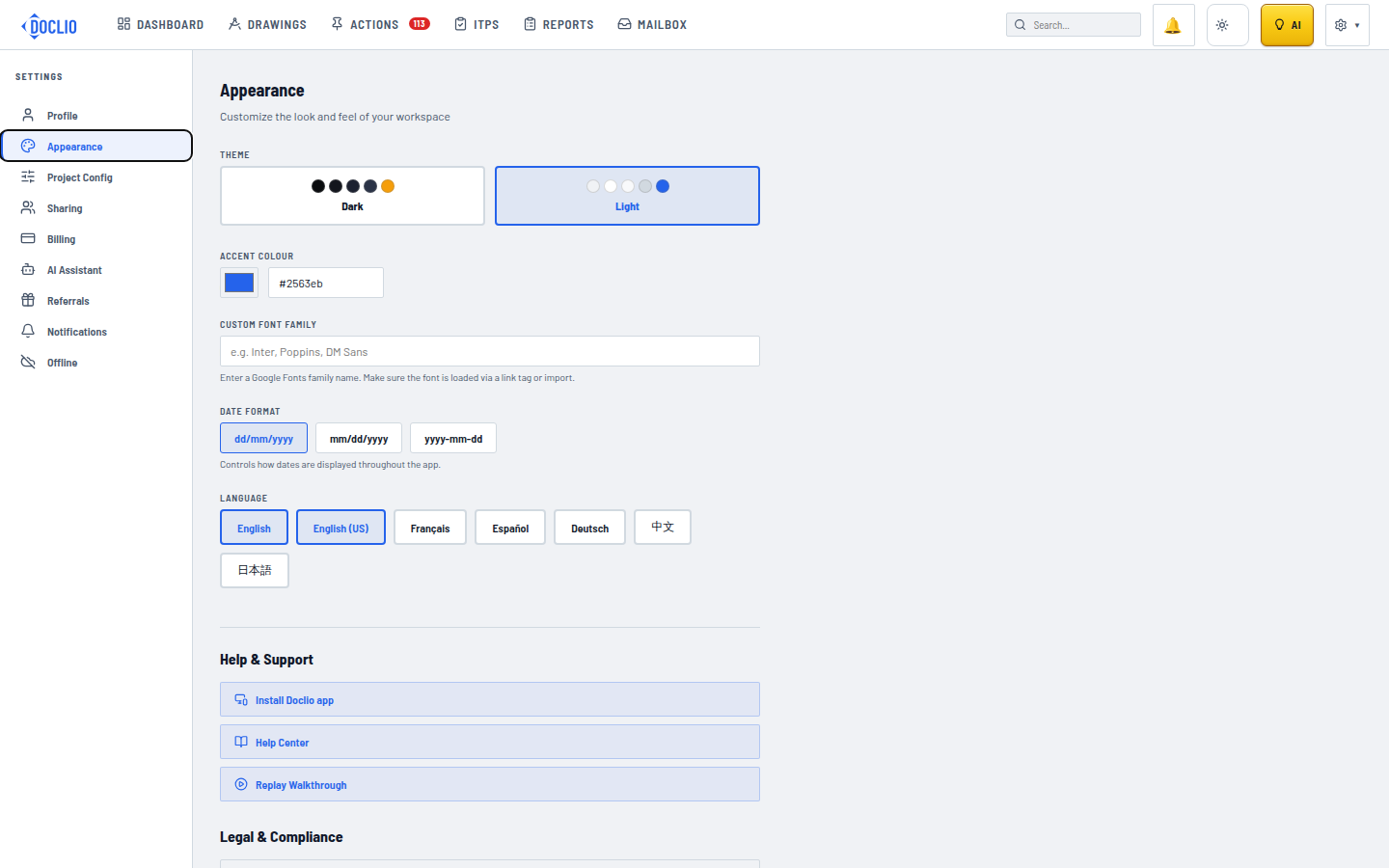
Customise How Doclio Looks
Doclio has two themes. You can switch at any time from Settings.
Available Themes
- Dark — Amber accents on a dark background. The default theme, good for low-light environments and reducing eye strain.
- Light — Blue accents on a light background. Best for bright environments and users who prefer light mode.
How to Change Your Theme
- Open your account menu (top right) → Settings
- Click the Appearance tab
- Click on the theme you'd like to use
- The change applies instantly — no need to save
Other Appearance Settings
The Appearance tab also holds these, all available on every plan:
- Accent Colour — override the theme's accent colour with your own
- Custom Font — type the name of any Google Font to replace the default fonts
- Date Format — dd/mm/yyyy, mm/dd/yyyy, or yyyy-mm-dd
- Language — see Language and Localisation
Looking for Something Else?
- Organisation logo — set under Settings → Profile (Default Logo). It's used on your reports and formal correspondence, and requires a paid plan (Growth or above).
- Annotation and status colours — set per project under Settings → Project Config. See Configuring Your Project.
Note: Your theme preference is saved to your browser. If you use Doclio on multiple devices, you'll need to set your theme on each device.
Appearance Settings