A programme looked solid on Friday. By Monday, one delayed shop drawing, a late procurement approval, and a missed concrete pour had pushed three follow-on trades out of sequence. The site team was suddenly talking about weekend work, acceleration costs, and whether the principal would accept a revised completion date.
That's the situation most project managers are trying to control when they search what is the critical path method. They're not looking for a classroom definition. They're trying to work out why a delay that looked minor on paper has started to drag the whole job.
The Critical Path Method, or CPM, is the discipline that brings order to that problem. It shows which sequence of activities controls the project finish date, which tasks have room to move, and which “small” delays aren't small at all. On a live construction project, that matters far more than a pretty bar chart.
Table of Contents
- Why a Small Delay Can Derail Your Entire Project
- The Core Concepts of the Critical Path Method
- Calculating the Critical Path Step by Step
- How to Interpret Your CPM Results
- Applying CPM on Construction and Capital Projects
- Common Pitfalls and How to Avoid Them
- CPM vs PERT vs Gantt Charts
Why a Small Delay Can Derail Your Entire Project
A steel delivery slips. On its own, that doesn't sound catastrophic. But the steel needs to arrive before installation. Installation needs to finish before deck works. Deck works need to finish before follow-on services can start safely. By the time the delay shows up in the site meeting, four crews are affected and the completion milestone is under pressure.
That's why experienced planners don't judge delay by how annoying it feels. They judge it by where it sits in the logic.
A project always has many activities happening in parallel. Some can absorb movement. Others can't. If an activity sits on the chain that determines the finish date, any delay to it pushes the whole project unless something else changes. That chain is the critical path.
On site, a delay becomes dangerous when it hits a dependency that no one can work around.
This is exactly the problem CPM was built to solve. The method was first developed in the late 1950s and first used in 1958 on a chemical plant construction project by DuPont and Remington Rand, which is why it became closely associated with large industrial and construction scheduling problems rather than simple task lists, as outlined in EBSCO's overview of the critical path method.
That history matters. CPM didn't come out of lightweight admin work. It came out of environments where sequencing errors, missed interfaces, and trade coordination failures had real cost and time consequences. That's close to the situation of major building and infrastructure work in Australia.
What this looks like in practice
On a real job, the early warning signs are usually familiar:
- A design release slips and procurement can't place an order.
- A workfront doesn't open because predecessor trades are incomplete.
- An approval sits unresolved and downstream crews burn available float.
- Teams resequence informally without updating the programme logic.
Once that starts happening, a static schedule stops being useful. You need a model that shows cause and effect. CPM does that. It tells you which delay is local noise and which one threatens handover.
The Core Concepts of the Critical Path Method
If you want a practical answer to what is the critical path method, start with the parts that drive it. CPM isn't magic. It's a logic model built from activities, durations, and dependencies.
Think about a small shed build. You can't install cladding before the frame is up. You can't frame before the slab is ready. You may be able to order materials while approvals are being finalised, but only if the design is sufficiently settled. CPM maps those relationships properly.
The building blocks
Here are the core concepts in plain language:
- Activity. A defined piece of work. Pour slab, install formwork, issue shop drawings, inspect reinforcement.
- Duration. How long that activity is expected to take.
- Dependency. The relationship between tasks. One task starts only after another finishes, or sometimes in controlled overlap.
- Path. A chain of linked activities from project start to project finish.
- Critical activity. An activity with zero float. If it slips, the project finish slips.
A concise definition comes from Wikipedia's entry on the Critical Path Method, which describes CPM as a scheduling technique that identifies the sequence of activities determining project duration, with critical tasks having zero float and therefore no ability to slip without extending the overall timeline.
Why logic matters more than task lists
A task list tells you what exists. A CPM schedule tells you what controls what.
That distinction catches newer project managers out. They create a detailed list of activities, then assume detail equals control. It doesn't. If the dependencies are wrong, the programme may look complete while still telling you the wrong completion story.
Practical rule: A schedule with weak logic is worse than a shorter schedule with clear logic. At least the second one tells the truth.
A good CPM network answers a few hard questions quickly:
| Question | What CPM shows |
|---|---|
| What determines the finish date? | The longest dependent path |
| Which tasks can't move? | Tasks with zero float |
| Where is there flexibility? | Non-critical tasks with available float |
| What should the team watch daily? | Activities on or near the critical path |
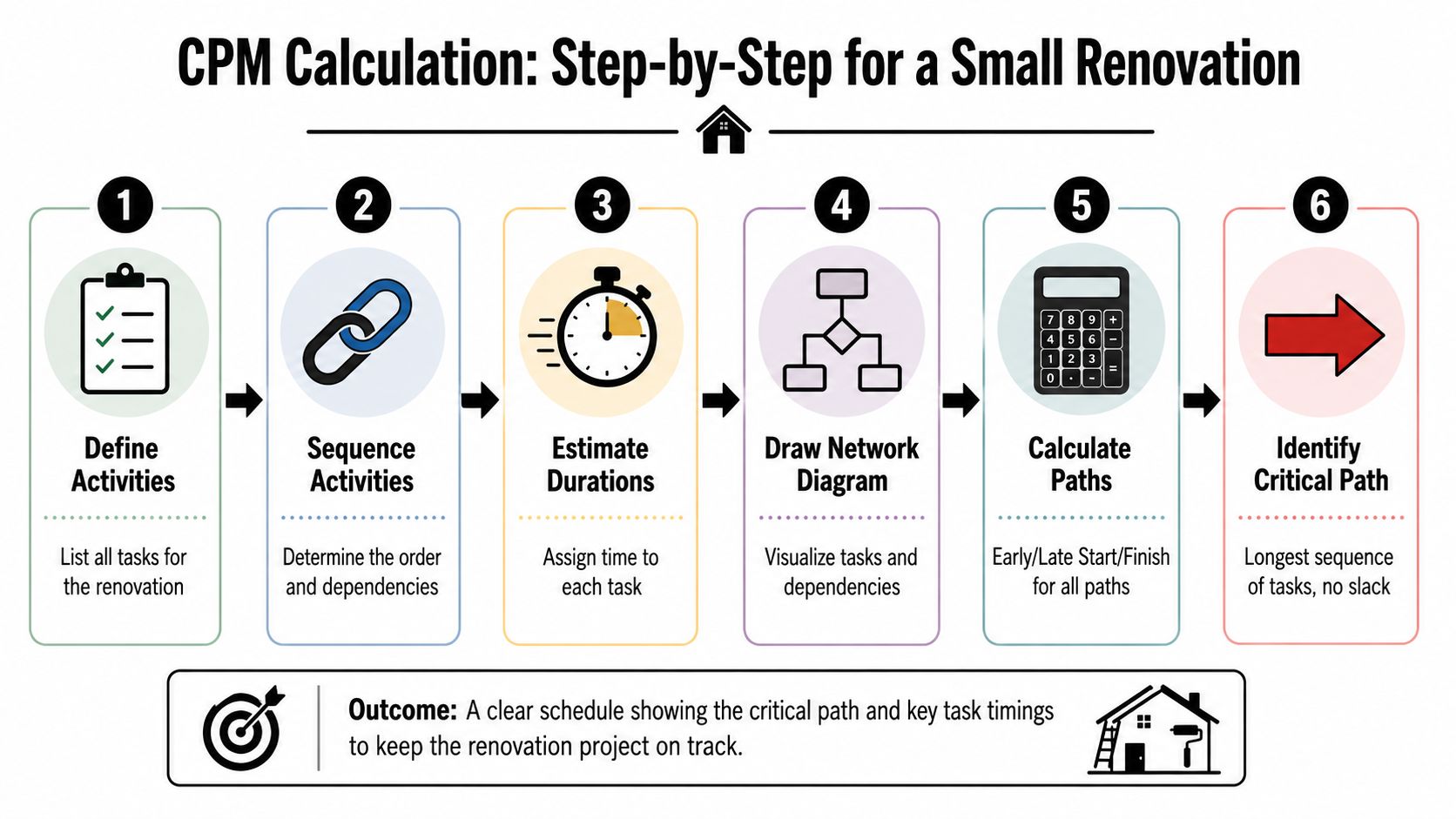
A short visual helps if you want to see the sequence from task list to critical path.
A useful site mindset
Don't think of CPM as software output. Think of it as a map of constraints. If the map is accurate, you can make decisions earlier. If it isn't, the programme becomes decoration.
That's why the strongest schedules are built around real interfaces: design issue dates, procurement release points, access constraints, inspections, hold points, authority approvals, and trade handovers. Those are the things that stop work.
Calculating the Critical Path Step by Step
CPM is comprehensible once one works through a small example. The arithmetic isn't complicated. The discipline is in setting the logic correctly.
Use this simple renovation example:
| Activity | Description | Duration | Predecessor |
|---|---|---|---|
| A | Site setup | 2 days | None |
| B | Demolition | 3 days | A |
| C | Rough-in services | 4 days | B |
| D | Framing | 2 days | B |
| E | Plasterboard | 3 days | C, D |
| F | Painting | 2 days | E |
| G | Final fit-off | 2 days | F |
Start with activities and logic
Before doing any pass calculation, sense-check the sequence.
Demolition must follow site setup. Rough-in services and framing both depend on demolition. Plasterboard can't start until both are complete. Painting follows plasterboard, and final fit-off follows painting.
That gives you two parallel streams after demolition:
- Path 1. A → B → C → E → F → G
- Path 2. A → B → D → E → F → G
The path through rough-in services is longer than the path through framing, so it's already the likely critical path. The forward and backward pass confirm it.
Run the forward pass
The forward pass calculates the earliest time each activity can start and finish.
Use this simple logic:
- Early Start (ES) is the earliest an activity can begin
- Early Finish (EF) = ES + Duration
- If an activity has more than one predecessor, its ES is the latest EF of those predecessors
Now apply it:
| Activity | Duration | ES | EF |
|---|---|---|---|
| A | 2 | 0 | 2 |
| B | 3 | 2 | 5 |
| C | 4 | 5 | 9 |
| D | 2 | 5 | 7 |
| E | 3 | 9 | 12 |
| F | 2 | 12 | 14 |
| G | 2 | 14 | 16 |
The earliest completion time for the whole project is 16 days. That duration comes from the longest dependent path through the network.
Run the backward pass
The backward pass tells you the latest each activity can start or finish without delaying project completion.
Use this logic:
- Start from the project finish
- Late Finish (LF) for the last activity equals its EF
- Late Start (LS) = LF - Duration
- If an activity has more than one successor, its LF is the earliest LS of those successors
Now work backwards:
| Activity | Duration | LF | LS |
|---|---|---|---|
| G | 2 | 16 | 14 |
| F | 2 | 14 | 12 |
| E | 3 | 12 | 9 |
| C | 4 | 9 | 5 |
| D | 2 | 9 | 7 |
| B | 3 | 5 | 2 |
| A | 2 | 2 | 0 |
Now compare early and late dates.
- A ES 0, LS 0
- B ES 2, LS 2
- C ES 5, LS 5
- D ES 5, LS 7
- E ES 9, LS 9
- F ES 12, LS 12
- G ES 14, LS 14
Identify the critical path
The activities where early and late dates are the same have zero float. In this example, those are:
- A
- B
- C
- E
- F
- G
So the critical path is:
A → B → C → E → F → G
Activity D is not critical because it has room to move.
If a task can slip and the project finish still holds, it isn't controlling the job today.
This is the point many teams miss. The result isn't just a line through a diagram. It's a management priority list. The critical path tells you where supervision, procurement follow-up, design coordination, and daily reporting should focus first.
How to Interpret Your CPM Results
Calculating the path is the easy part. The value comes from interpreting what the schedule is telling you.
A CPM programme is not just a finish date calculator. It's a risk map. It shows which work packages control time, which tasks have flexibility, and where a small change is likely to become a wider disruption.
Read the path, not just the bars
Using the example above, the obvious conclusion is that A → B → C → E → F → G controls completion. But a better reading goes further.
It tells you demolition and rough-in services deserve tight management because they sit early on the controlling path. If rough-in services start drifting, the downstream effect is immediate. Framing, by contrast, has some tolerance.
That doesn't mean framing is unimportant. It means it is not currently the task that sets the finish date.
Understand total float and free float
Two float concepts matter in practice.
| Float type | Meaning | Why it matters on site |
|---|---|---|
| Total float | How long a task can slip without delaying project completion | Helps prioritise reporting and recovery effort |
| Free float | How long a task can slip without delaying the next task | Helps short-term coordination between trades |
In the renovation example, D Framing has total float because it can finish later than its early finish and still not delay plasterboard, provided it finishes before E must start.
That distinction matters when you're trying to recover time. A superintendent may be comfortable using some float on a non-critical activity if it protects a constrained critical activity. That can be a smart move. It can also become dangerous if nobody tracks how much float has already been consumed.
Non-critical doesn't mean safe. It often means safe for now.
Watch for near-critical paths
One of the easiest mistakes in CPM interpretation is to focus only on the current critical path and ignore paths that are close behind.
In the example, the path through D Framing is shorter, but not by much. If framing stretches, or if rough-in services finishes earlier than expected, the balance can change. That's how teams get surprised by a new critical path halfway through the job.
A useful review habit is to ask:
- Which activities have zero float right now
- Which path is close enough to become critical if one task shifts
- Which procurement, approval, or access issues could change the path
- Which assumptions in the programme are no longer true on site
If you read CPM this way, the schedule stops being an administrative file and becomes a live decision tool.
Applying CPM on Construction and Capital Projects
The biggest mistake teams make with CPM is treating it as a planning deliverable instead of a control system. On a live project, the critical path is not fixed. It moves when logic changes, when progress differs from plan, and when site conditions force resequencing.
That matters in Australia because construction activity is large and interconnected. The Australian Bureau of Statistics reported construction work done of about A$65.4 billion in the March 2025 quarter, as referenced in the AHRQ discussion of the critical path method as a tool for identifying scheduling and resource problems. On projects at that scale and complexity, a static CPM explanation doesn't match real controls practice.
Treat the programme as a control model
A useful site programme does four things repeatedly:
- Updates actual progress so logic reflects reality, not last month's assumptions.
- Tests delay impact by recalculating the path after slippage, design changes, or changed access.
- Shows resequencing effects before the team commits to a recovery plan.
- Supports evidence for extension of time analysis, subcontract coordination, and stakeholder reporting.
A common pitfall for junior PMs is thinking “the critical path” is one permanent chain established at baseline. It isn't. It is the chain that controls completion now, based on the current logic and current status.
Use updates to support decisions
On active construction and capital projects, CPM helps most when it is tied to decisions people need to make.
For example:
- Procurement follow-up. If a long-lead item sits on a live critical chain, the team needs faster escalation, not routine status notes.
- Trade coordination. If two subcontractors are consuming the same float from opposite sides, the PM needs to intervene before the clash turns into delay.
- Change assessment. If a design change affects a controlling activity, you need to test the programme impact immediately.
- Recovery planning. If the team proposes overlap or acceleration, run it through the logic first. Some recovery ideas only move work around visually. They don't shorten the controlling path.
A programme update is only useful if it changes someone's decision.
The strongest project controls teams keep schedule logic close to site reality. They speak with foremen, services managers, design managers, and procurement leads. They don't just collect dates. They check whether the sequence still reflects how the job will be built.
That's the practical difference between schedule administration and schedule control.
Common Pitfalls and How to Avoid Them
CPM is reliable when the model reflects reality. It becomes misleading when teams use it as a neat planning exercise and ignore uncertainty, resource constraints, or shifting site conditions.
Where CPM gets misused
A common mistake is assuming every duration is solid because it was entered into software. On many projects, durations involve judgement, crew assumptions, supply assumptions, approval assumptions, and weather assumptions. If those are weak, the output will still look precise, but it won't be trustworthy.
Another problem is missing logic. Teams often link the obvious construction sequence but leave out design approvals, authority hold points, procurement release dates, access restrictions, or commissioning prerequisites. The result is a schedule that looks buildable but isn't.
A third issue is overconfidence in a single critical path. On paper, one path may control completion today. In reality, a near-critical path may be one delay away from taking over.
What to do instead
The smarter approach is to treat CPM as one tool, not the whole answer. A more nuanced view is reflected in Harvard Business Review's discussion of the ABCs of the critical path method, which points to cost and schedule trade-offs and helps explain why CPM should be supplemented when durations are uncertain.
Use practical safeguards:
- Add risk thinking early. Where durations are uncertain, don't pretend they are fixed facts. Flag assumptions and review them regularly.
- Use rolling-wave planning. Keep near-term work detailed and realistic. Leave later work at the right level of certainty until information improves.
- Check resource reality. A valid logic path can still fail if the same crew, crane, or engineer is assumed to be in two places at once.
- Review near-critical work. Don't wait until a second path becomes critical before managing it.
A polished schedule can still be wrong. Logic quality beats presentation quality every time.
Used properly, CPM is strong. Used carelessly, it gives false confidence. That isn't a flaw in the method. It's a modelling failure.
CPM vs PERT vs Gantt Charts
Project teams often use these terms as if they are interchangeable. They aren't. Each does a different job.
CPM is best when you need to determine the controlling sequence of work and understand which tasks drive completion. PERT is more useful when durations are uncertain and you want a planning method that reflects that uncertainty. A Gantt chart is primarily a visual timeline. It can display critical path information, but it is not the same thing as the method that calculates it.
CPM vs PERT vs Gantt Chart
| Technique | Primary Focus | Time Estimate | Best For |
|---|---|---|---|
| CPM | Determining the sequence of activities that controls project duration | Single estimated duration for each activity | Construction, capital works, and other projects with defined logic and stronger predictability |
| PERT | Planning under uncertainty | Range-based thinking rather than one fixed duration | Research, development, and early-stage work where durations are less certain |
| Gantt Chart | Visualising schedule and progress over time | Shown as timeline bars | Communicating programme status, sequencing, and progress to the wider team |
Which one should you use
In practice, most construction teams don't choose one and ignore the others.
They usually:
- use CPM to build the schedule logic
- present that schedule in a Gantt chart for reporting and site communication
- borrow PERT-style thinking when durations are highly uncertain, especially in early planning or high-risk work packages
That combination is usually stronger than rigid loyalty to one format. The main thing is knowing what each tool is for.
If your project has firm dependencies, multiple trades, procurement interfaces, and a contractual completion date, CPM should be at the centre of schedule control. If your durations are highly variable, supplement it. If you need to show the plan clearly to the team, a Gantt view helps. Just don't mistake the picture for the analysis.
Doclio helps construction teams keep the information behind the programme aligned with what's happening on site. With Doclio, teams can manage drawings, revisions, approvals, field markups, and project documents in one place, so schedule conversations are tied to the latest project information rather than outdated files and scattered email chains.